Long video in.
Viral shorts out.
Paste a long video and get ready-to-post vertical shorts, captioned, reframed, and titled for every platform. In minutes, in any language.
Free to start · no card on the free plan · first clips in minutes
Changes you see in the clip
We took real projects, looked at the frames and listened to the captions, and fixed what a viewer notices.
Framing that follows the cut
Auto framing decides shot by shot: crop to the face, or the whole frame when nobody is in it.
Captions that get the words right
A second pass corrects misheard words in every language, without moving a single caption.
A headline you place
Keep it clear of the face automatically, or pin it top, centre or bottom. The cover carries the same one.
Your brand in every language
Fonts per language, presets previewed in that language, and an end card voiced in the clip's own tongue.
Calendar and team
Your own timezone, nothing scheduled into the past, and teammates on Pro and Creator.
Spike Agent, redesigned
A launchpad that shows what it can do, and a card that follows your running job live.
The newest tools go live on Spark first.
Spark is SpikeReel's tools site. Three are open now, and everything you make there lands in your normal projects.
Explore Spark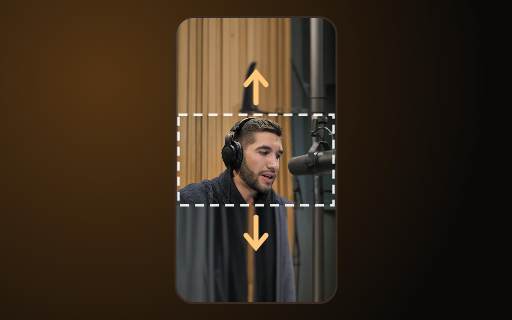 AI ExpandTurn a wide video into a vertical one without cropping the action. The missing picture is painted in above and below.
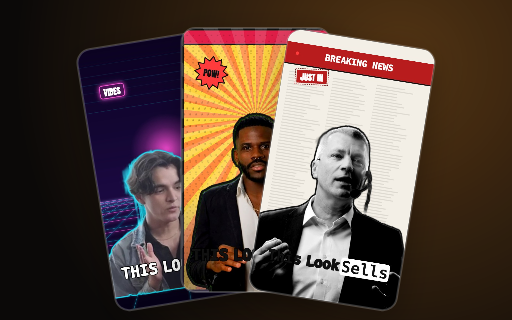 Viral PresetsCut your speaker out and drop them into a designed look, with animated words and reactions that match what is said.
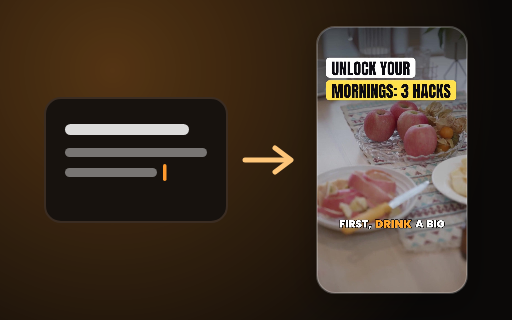 Idea to videoType a topic and get a finished short back, with footage, a headline and captions already on it.
spark.spikereel.com
Captions in your video's own language. Never auto-translated.
Most AI clippers caption in English or quietly machine-translate your words. SpikeReel transcribes and captions in the language you actually spoke, so your clips sound like you, not a translation.
Built for creators who ship, on every platform that matters
These are real clips.
Every clip on the right came out of SpikeReel from one long video: the moment picked automatically, reframed to vertical, captions burned in, title and hashtags written. Nothing was touched by hand afterwards.
- ✓ Moments chosen from the transcript, not keywords
- ✓ Vertical reframe with speaker tracking
- ✓ Captions, title and hashtags in the video's own language
AI that finds your most viral moments
No more scrubbing a 2-hour video for the good parts. SpikeReel reads the whole thing, scores every moment for hooks, emotion and pacing, and hands you the clips most likely to pop, each with a virality grade.
Captions that pop, reframing that tracks
Word-by-word animated captions burned in, in the video's own language, plus speaker-tracking auto-reframe that keeps the talking head perfectly in the 9:16 frame. Pick a style and it's done.
- ✓ Bold Gold, Clean and Neon caption styles
- ✓ 90+ languages, never auto-translated
- ✓ Face-tracking auto-reframe
Publish everywhere, on autopilot
Generate per-platform titles, descriptions and hashtags, tuned for each network and written in your language, then schedule or post to TikTok, YouTube, Reels, X and more without leaving the studio.
Or just chat to get it done
Paste a link and tell the Agent what you want. It clips your video, generates new clips from a prompt, and schedules the best ones to your channels, all from one chat.
- ✓ "Clip this and post the top 3 to TikTok, one a day"
- ✓ "Make a video of a sunset over the city"
- ✓ "Give me 5 hooks for a fitness podcast"
From raw footage to ready-to-post
Three steps. A few minutes.
Everything you need to clip at scale
Clip at scale with the SpikeReel API
Wire clipping into your own product or pipeline. Submit a video, poll for results, publish to social, and get signed webhooks when clips are ready.
- ✓ REST API with bearer-token auth
- ✓ Publish & schedule to every platform
- ✓ Signed webhooks, no polling required
Choose your plan
Start free. Upgrade when you're ready to scale.
- ✓60 credits / month
- ✓Try Viral Presets: 20 credits a look
- ✓Up to 8 clips per video
- ✓Viral-moment detection + score
- ✓Animated captions & auto-reframe 9:16
- ✓AI titles & hashtags
- ✓Try 3 idea-to-video creations
- ✓Connect socials, schedule & publish
- ✓Clips kept for 14 days
- ✓350 credits / month
- ✓Brand kit watermark + music bed
- ✓Designed cover thumbnail per clip
- ✓Up to 16 clips per video
- ✓In-app Agent: drive the studio by chat
- ✓Captions in 90+ languages
- ✓Auto-translate captions
- ✓Tighten (remove silence & filler)
- ✓Schedule & publish to socials
- ✓Idea to video: type a topic, get a ready short
- ✓Clips kept for 30 days
- ✓Upload your own finished videos to schedule
- ✓1,400 credits / month
- ✓Priority support chat
- ✓Up to 24 clips per video
- ✓Speaker auto-reframe (face tracking)
- ✓AI B-roll cutaways
- ✓Multiple aspect ratios (9:16, 1:1, 16:9)
- ✓FCPXML export to editors
- ✓Idea to video: type a topic, get a ready short
- ✓Everything in Starter
- ✓4,000 credits / month
- ✓16 GB uploads + priority processing
- ✓Up to 32 clips per video
- ✓Public REST API with signed webhooks
- ✓Idea to video: type a topic, get a ready short
- ✓Everything in Pro
Need a plan for a team or agency? Contact sales →
Questions, answered
What is SpikeReel?⌄
An AI clip studio that turns long videos into short, captioned, vertical clips, picking the moments worth posting from what is actually said.
How does it work?⌄
Upload a video or paste a link. We transcribe it, find the best moments, reframe to 9:16, and burn in animated captions with a title and hashtags, ready to post in minutes.
What languages are supported?⌄
Captions, titles and hashtags are generated in the video's own language, 90+ languages, including right-to-left and non-Latin scripts, never auto-translated to English.
What kind of video works best?⌄
Anything where someone is talking: podcasts, interviews, vlogs, webinars, lectures and livestream recordings. SpikeReel works from what is said, so music-only or stock footage has nothing to clip.
Where can I post the clips?⌄
Download them, or publish and schedule to TikTok, YouTube, Reels, X, LinkedIn and more, right from the studio.
Do I need a credit card to start?⌄
No. Start free and upgrade only when you're ready to scale.
From the blog
Playbooks to grow faster with short video.
The title panel: the podcast-clip layout every big account uses, and when to use it
Look at the clips that travel from any large podcast and most of them share one shape: a headline on top, the picture in a box, the captions underneath. Here is why that layout wins, when the plain full-frame cut is better, and how to get either in one click.
5 min readHow loud should a short video be? The -14 LUFS rule, explained
Every platform turns your audio up or down to its own target before anyone hears it. Deliver at the wrong level and your clip comes out quiet next to the one before it, or crushed. Here are the numbers, what they mean, and the two mistakes that undo them.
4 min readOne clip, every network: posting to YouTube, TikTok, Facebook, Threads, LinkedIn, Bluesky and Telegram from one place
Three more networks joined the ones you can post to straight from a clip: LinkedIn, Bluesky and Telegram. Here is what posts natively, what goes through your own scheduling key, and how a calendar of clips actually gets published without you opening seven apps.
4 min readTurn one video into ten.
Clip, caption, reframe, generate, and schedule, all in one studio. Start free today.
Get started free →