Captions for Any Video, in Any Language: SRT, VTT or Burned In
Most people watch with the sound off. A new SpikeReel tool turns a whole video into timed captions in its own language, as SRT, VTT and text files or as the finished video with the words on screen.
A video without captions loses most of its audience before the first sentence ends. People scroll with the sound off on the train, in the office and in bed, and a speaker they cannot read is a speaker they skip. Captions are no longer an accessibility extra. They are the part of the video most viewers actually take in.
What the Captions tool does
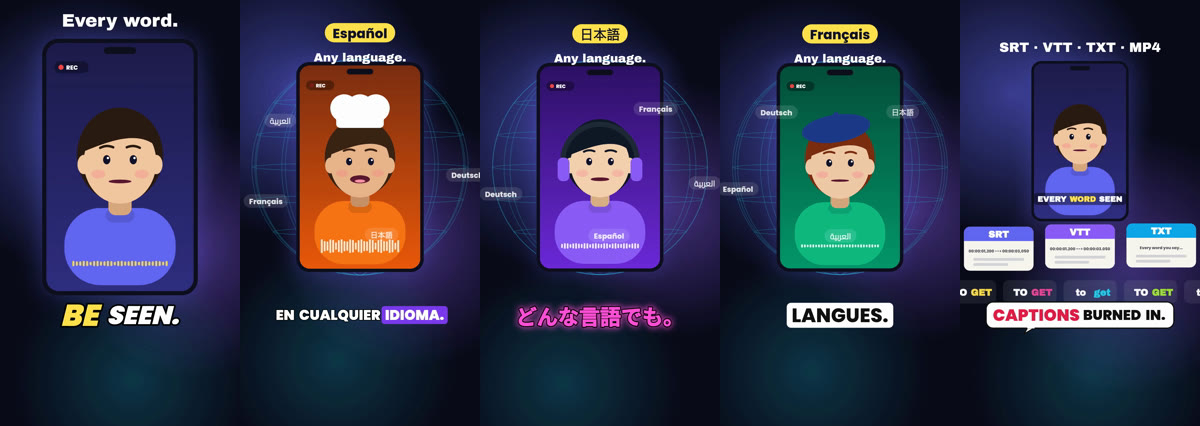
Captions on Spark takes a whole video, by link or by upload, and writes down every word with its timing. Nothing is cut or clipped. You choose what you get back: the transcript files to use anywhere, or the whole video returned with the captions already on screen.
| You choose | What you get | Good for |
|---|---|---|
| Transcript only | SRT, VTT and plain text files, timed to the word | YouTube and Vimeo subtitle tracks, show notes, blog posts, search |
| Captioned video | The whole video with captions burned in, plus the SRT, VTT and text | TikTok, Reels and Shorts, where viewers never switch subtitles on |
Any language, written the way it is spoken
The tool listens for the language first and transcribes in that language, so a Spanish video gets Spanish captions and an Arabic video gets Arabic captions that run right to left. Japanese and Chinese are written without spaces between words, the way native readers expect, instead of being broken into separate characters.
Make the captions look like yours
- Choose from 20 caption looks, from bold word-by-word highlights to clean documentary subtitles, or let SpikeReel pick one that suits the video.
- Place the captions exactly: top, middle, bottom, or drag them on the live preview to the spot you want.
- Keep the original shape, or get the video back in 9:16 or 1:1 for short-form platforms.
- Add your own logo on paid plans, or leave it off.
Fix a word before it goes out
Names, brands and slang are where any recogniser slips. Open the transcript, correct the line, and the SRT, VTT and text files are rewritten on the spot. Burn the captions again and the video follows the corrected text, with each sentence keeping its own timing.
From captions to a post
- Paste a link or upload the video on spark.spikereel.com/captions.
- Pick transcript only, or a captioned video with the look and position you want.
- Download the SRT, VTT, text or MP4, or schedule and publish the captioned video straight to your connected accounts.
Captions is live on Spark now. Paste any video and get its captions back in its own language, as files or burned into the video.
Want clips like this from your own footage? Try the AI video clipping tool free, no credit card.
Turn your long videos into viral shorts
SpikeReel finds your best moments, reframes them vertical, and burns in captions, automatically.
Start free